RTMP, or Real-Time Messaging Protocol, is an application-layer protocol used to transmit audio, video, and data between connected systems.
In modern live streaming, RTMP is primarily used to send a live feed from a hardware or software encoder to a media server or streaming platform. The media platform can then transcode, package, protect, and distribute the feed through viewer-facing protocols such as HLS, DASH, HTTP-FLV, or WebRTC.
The legacy RTMP specification describes RTMP as an application-level protocol that multiplexes and packetizes multimedia streams over a suitable transport protocol, typically TCP.
RTMP was historically associated with Adobe Flash playback. Adobe ended support for Flash Player on December 31, 2020, and modern browsers generally do not play RTMP streams directly. RTMP remains relevant as an ingest protocol because many encoders, streaming platforms, and media delivery systems continue to support RTMP or its encrypted form, RTMPS.
Key Takeaways
-
RTMP is a streaming protocol. RTMP servers, URLs, and stream keys are components of an RTMP workflow.
-
RTMP is commonly used for live ingest, where an encoder sends a live feed to a media platform.
-
RTMP and HLS frequently work together. RTMP carries the incoming stream, while HLS distributes processed video to viewers.
-
RTMPS adds TLS encryption and should generally be preferred when the encoder and streaming service support it.
-
Enhanced RTMP, or E-RTMP, extends the RTMP ecosystem with modern codec signaling, multitrack streaming, reconnection capabilities, and higher-precision timing.
What is RTMP?
RTMP is a bidirectional messaging protocol that carries timed audio, video, data, commands, and control information between a client and a server.
RTMP maintains a persistent connection between a client and a server. It can multiplex different message types across that connection, allowing audio, video, metadata, and protocol-control information to travel as part of the same streaming session.
In a modern live-streaming workflow, the RTMP client is usually an encoder. The encoder captures or receives a video source, compresses it, and publishes it to an RTMP ingest endpoint.
A typical modern RTMP workflow looks like this:
Camera or video source → Encoder → RTMP or RTMPS ingest → Media server → Transcoding and packaging → CDN → Viewer
The viewer does not usually receive the original RTMP connection. Instead, the media platform converts or packages the feed into a playback format suited to the viewer’s browser, application, device, and network.
This distinction explains why RTMP remains relevant after the retirement of Flash. Its main modern role is on the contribution, or ingest, side of the streaming workflow.
What is RTMP Streaming?
RTMP streaming is the transmission of live or recorded media through an RTMP connection between a publishing client and a server.
In a live workflow, the publishing client is usually a software or hardware encoder. It captures the source video, compresses the audio and video, and sends the encoded feed to an RTMP ingest endpoint.
RTMP can carry:
- Video data
- Audio data
- Stream metadata
- Commands and status messages
- Timing information
- Application data
The media server receives these messages, identifies the stream, and performs the processing required by the streaming service. That processing may include transcoding, recording, packaging, monitoring, access control, and distribution.
How Does RTMP Streaming Work?
RTMP streaming works by establishing a connection between an encoder and a server, creating a logical media stream, and continuously transmitting packetized audio, video, and metadata.
1. The source is captured and encoded
A camera, screen-capture application, production system, game console, or other source provides raw audio and video to an encoder.
The encoder compresses the source and prepares it for transmission. Common configuration settings include:
- Video and audio codecs
- Resolution
- Frame rate
- Video bitrate
- Audio bitrate and sample rate
- Keyframe interval
- Rate-control mode
The correct settings depend on the receiving platform. An encoder configuration outside the platform’s supported profile may be rejected or may produce unstable processing and playback.
2. The encoder connects to the RTMP server
The encoder uses an RTMP or RTMPS server address supplied by the streaming platform. It may also use a stream key or another authentication method.
An RTMP connection begins with a handshake between the client and server. After the handshake, the client sends a connect command to request access to an application on the server.
The client then creates a logical stream and publishes the media. The RTMP specification defines commands such as connect, createStream, and publish as part of this workflow.
3. RTMP transmits media as messages and chunks
RTMP carries audio, video, data, commands, and control information as messages.
Larger messages can be divided into smaller chunks before transmission. Chunking allows different types of information to be interleaved across the same connection. For example, audio, video, and control messages can continue to share the transport without waiting for one large message to finish.
Each message includes timing and stream information so the receiver can identify, order, and process the content correctly.
4. The media platform processes and distributes the feed
After receiving the stream, the media platform may:
- Authenticate and validate the publisher
- Transcode the feed into multiple resolutions and bitrates
- Generate an adaptive bitrate ladder
- Package the stream for HLS, DASH, WebRTC, or another delivery format
- Record or archive the broadcast
- Apply access and content-protection controls
- Monitor ingest and playback quality
- Distribute the stream through a CDN
The result is a multi-stage streaming workflow in which RTMP handles the incoming feed, while other technologies handle processing and viewer delivery.
What is RTMP Ingest?
RTMP ingest, also called live ingest, is the process of sending a live audio and video feed from an encoder to a media server through RTMP.
Ingest is the upstream stage of a live-streaming workflow. It connects the broadcaster or content producer to the streaming infrastructure before the feed is processed and delivered to viewers.
An RTMP ingest server is the server or service endpoint that receives the encoder’s incoming stream. Depending on the architecture, it may authenticate the publisher, identify the stream, monitor the connection, and route the content to an origin or media-processing system.
A typical RTMP ingest workflow follows these steps:
- A production team configures its encoder with an RTMP or RTMPS server address and stream key.
- The encoder publishes the live feed to an ingest server.
- The media platform receives and processes the stream.
- The stream is packaged into viewer-compatible formats.
- A CDN distributes the processed content to the audience.
RTMP ingest remains widely supported by broadcasting applications, hardware encoders, enterprise event platforms, and live-streaming services.
What is RTMPS?
RTMPS is RTMP transmitted through a TLS-encrypted connection.
RTMPS protects the media stream and connection information while data travels between the encoder and ingest server.
Google describes RTMPS as RTMP over a Transport Layer Security, or TLS/SSL, connection. YouTube supports RTMPS to encrypt live-stream data during ingest.
RTMPS does not replace other security controls, including:
- Account security
- Stream-key protection
- Publisher authentication
- Viewer authorization
- Digital rights management
- Playback-layer encryption
- Access-control policies
When RTMP and RTMPS are both supported, RTMPS is generally the more appropriate option for production streaming over public networks.
What are the Advantages and Limitations of RTMP Streaming?
Advantages of RTMP Streaming
-
Broad compatibility: RTMP works with many broadcasting applications, hardware encoders, media servers, production systems, and streaming platforms. This makes it a practical choice when connecting technologies from different vendors.
-
Mature ingest workflows: Many streaming teams already have RTMP encoder presets, authentication systems, monitoring tools, and publishing procedures in place. This reduces setup complexity and makes RTMP easier to operate at scale.
-
Persistent media transport: RTMP maintains an active connection between the encoder and the server. It can carry video, audio, metadata, commands, and control information within the same session.
-
Flexible multi-protocol delivery: Platforms can receive a stream through RTMP and convert it into HLS, DASH, WebRTC, HTTP-FLV, or another playback format. Broadcasters can continue using familiar RTMP encoders while delivering content in formats suited to browsers, mobile apps, smart TVs, and CDNs.
-
Strong media-processing support: Once a platform receives an RTMP stream, it can transcode, record, package, monitor, secure, and distribute the content.
Limitations of RTMP Streaming
-
No encryption with standard RTMP: Plain RTMP does not encrypt data in transit. Streaming workflows that require transport security should use RTMPS, provided the encoder and ingest platform support it.
-
Limited browser playback support: Modern browsers do not generally support native RTMP playback. Traditional browser playback relied on Adobe Flash Player, which reached end of life in 2020. For this reason, platforms typically convert RTMP streams into HLS, DASH, WebRTC, HTTP-FLV, or another browser-compatible format.
-
Potential delays under poor network conditions: RTMP commonly runs over TCP, which retransmits lost data and processes packets in order. During packet loss or congestion, these retransmissions can increase delay. Performance may be affected by upload bandwidth, round-trip time, encoder buffering, network congestion, packet loss, and server configuration.
-
No guaranteed end-to-end latency: RTMP alone does not determine how quickly viewers receive a stream. Total latency also depends on encoder settings, network distance, transcoding, packaging, segment duration, CDN delivery, player buffering, and viewer connectivity.
Overall, RTMP is a dependable choice for live contribution and ingest, but it usually needs to be paired with a modern delivery protocol for secure, browser-compatible, and low-latency playback.
How Does RTMP Compare with HLS, SRT, RTSP, and WebRTC?
Streaming protocols often serve different stages of the workflow. The appropriate choice depends on whether the requirement involves ingest, contribution, distribution, session control, or real-time interaction.
| Protocol | Primary Role | Typical Connection | Main Strength | Main Consideration |
|---|---|---|---|---|
| RTMP or RTMPS | Live ingest | Encoder to media server | Broad publishing compatibility | Plain RTMP is unencrypted |
| HLS | Viewer playback and distribution | Server to player | HTTP-based delivery at scale | Segmenting and buffering affect latency |
| SRT | Contribution and transport | Source to media infrastructure | Recovery across unpredictable networks | Both endpoints must support SRT |
| RTSP | Session setup and control | Client and media server | Controls media sessions | Commonly works with separate transport mechanisms |
| WebRTC | Interactive real-time communication | Browser, application, or peer communication | Real-time browser and application interaction | Scaling and architecture can be more complex |
RTMP and HLS commonly work together, with RTMP handling ingest and HLS handling viewer delivery.
SRT may be more suitable for long-distance contribution over unstable networks. RTSP is commonly associated with IP cameras and controlled media sessions. WebRTC is commonly used for interactive browser and application experiences.
When Should You Use RTMP?
RTMP or RTMPS remains a practical choice when:
- You need to publish from a widely supported software or hardware encoder
- The receiving platform provides an RTMP ingest endpoint
- Your workflow combines RTMP ingest with HLS or DASH delivery
- You need compatibility with established broadcast tools
- Your upstream network is reasonably stable
- You are streaming webinars, corporate events, entertainment, sports, gaming, or live commerce
RTMPS should generally be preferred when the receiving platform supports it.
SRT may be more appropriate for contribution across unstable or long-distance networks.
WebRTC may be more appropriate for deeply interactive experiences.
HLS remains a common choice for broad device compatibility and HTTP-based viewer distribution.
How Can You Improve RTMP Stream Reliability?
Reliable RTMP streaming depends on the complete production and network environment.
-
Use an appropriate ingest endpoint:
Select an endpoint with a stable network route from the encoder. Test actual routing quality, packet loss, and upload performance. -
Follow the platform’s encoding requirements:
Use supported codecs, resolutions, frame rates, bitrates, keyframe intervals, and audio settings. -
Maintain upload-bandwidth headroom:
Available upload capacity should exceed the configured stream bitrate. -
Prefer RTMPS:
Use an encrypted endpoint when supported, and verify the scheme, hostname, port, and application path. -
Protect stream keys:
Restrict access to publishing credentials and regenerate exposed keys. -
Prepare redundancy:
Important broadcasts may require a backup encoder, network connection, power source, ingest endpoint, or secondary feed. -
Monitor the complete workflow:
Track the encoder, upload connection, ingest status, processing, CDN delivery, and viewer playback.
A successful encoder connection does not guarantee a successful viewer experience.
How CDNetworks Supports RTMP Ingest and Live Streaming
Live streaming relies on a combination of ingest, processing, and delivery technologies. RTMP remains a widely used ingest option because it integrates with established encoders and live-streaming workflows.
For CDN-based RTMP streaming workflows, CDNetworks’ Media Delivery services support the connection between RTMP ingest and distributed media delivery.
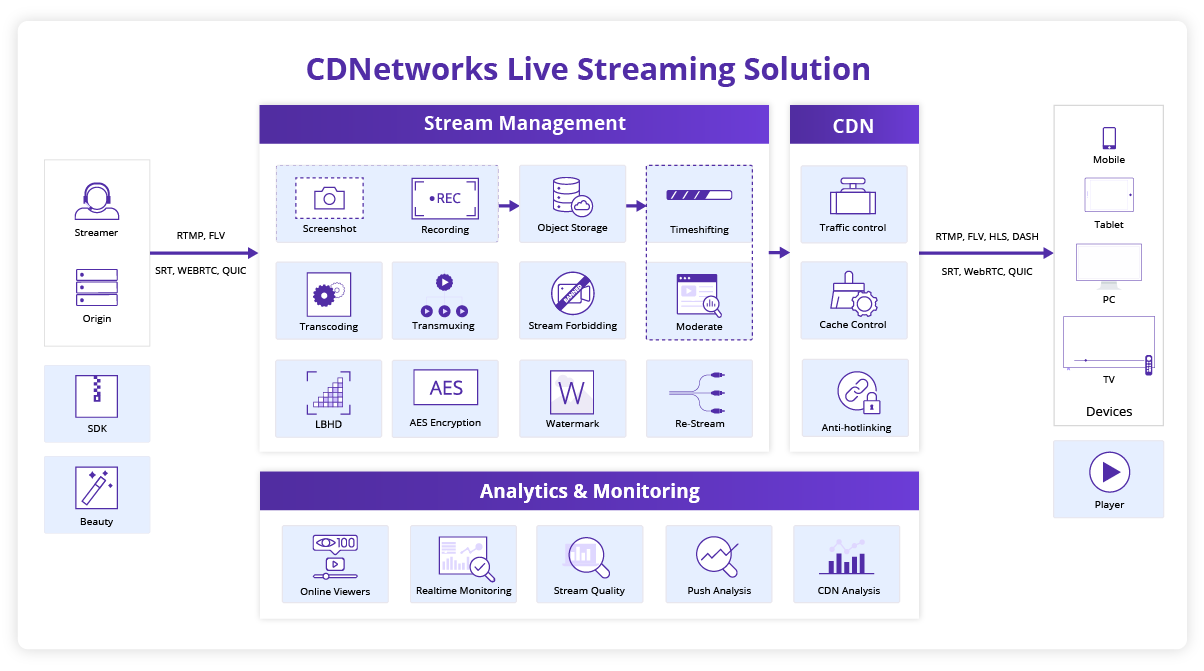
CDNetworks’ Enhanced RTMP/FLV support is designed to:
- Maintain compatibility with popular streaming software such as OBS and VLC
- Support a broader range of media formats
- Reduce the need for additional protocol replacement or adaptation
- Support low-latency streaming experiences
- Help providers balance audience experience with streaming costs
These capabilities can simplify existing RTMP workflows without requiring organizations to redesign their publishing setup unnecessarily.
Explore CDNetworks’ Media Delivery services or learn more about the Entertainment Live Streaming Solution.
Frequently Asked Questions
What does RTMP mean?
RTMP means Real-Time Messaging Protocol, an application-layer protocol that transmits timed audio, video, metadata, commands, and control information between connected clients and servers.
What is RTMP streaming?
RTMP streaming transmits live or recorded media over an RTMP connection, most commonly from a software or hardware encoder to a media server or streaming platform.
What is RTMP ingest?
RTMP ingest sends a live audio and video feed from an encoder to a media server, where the stream can be processed, transcoded, packaged, and distributed to viewers.
What is an RTMP server?
RTMP servers receive, process, route, publish, or play RTMP streams. An RTMP ingest server specifically accepts incoming feeds from software or hardware encoders.
What is the difference between an RTMP URL and a stream key?
RTMP URLs identify the ingest server and application path. Stream keys identify or authorize individual streams. Encoders may request these values separately or combine them into one publishing address.
Is RTMP secure?
RTMPS secures RTMP traffic with TLS encryption between the encoder and ingest server. Standard RTMP lacks this protection, so RTMPS is generally preferred when both endpoints support it.
What port does RTMP use?
RTMP commonly uses TCP port 1935. Some RTMPS services use TCP port 443, but publishers should always follow the connection details supplied by their streaming platform.
Can modern browsers play RTMP?
Modern browsers generally cannot play RTMP directly. Streaming platforms usually convert RTMP ingest into HLS, DASH, WebRTC, HTTP-FLV, or another format compatible with browsers and applications.
Is RTMP better than HLS?
RTMP and HLS serve different roles. RTMP commonly handles live ingest from an encoder, while HLS delivers processed video to viewers. Many live-streaming workflows use both.
Is RTMP still relevant?
RTMP remains relevant because many encoders, media servers, and streaming platforms support it for live ingest. Its main modern role is sending feeds into streaming infrastructure, rather than direct browser playback.