
DDoS attacks are a serious threat to websites, applications, and online services, making your website completely inaccessible and potentially impacting revenue and reputation.
Understanding how to stop a DDoS attack requires not only knowing the steps to mitigate it but also understanding how these attacks work and why certain strategies are effective.
If your website or application is experiencing a suspected DDoS attack, the immediate priority is to confirm the incident, involve your network or DDoS mitigation provider, and protect legitimate traffic. The correct response depends on whether the attack is saturating network bandwidth, exhausting connections, or overwhelming application resources.
The steps below provide an incident response framework. For background on the threat itself, see our guide explaining what a DDoS attack is.
What Are the Signs of a DDoS Attack?
Early detection is critical to reducing impact. Look out for:
- Sudden traffic spikes from unusual locations.
- Slower website or application performance.
- Server overload, including high CPU or memory usage.
- Connectivity problems, like intermittent outages or timeouts.
How to Stop a DDoS Attack
1. Confirm the Attack and Identify Affected Services
Compare current traffic, error rates, and resource utilization with normal baselines. Identify affected domains, IP addresses, applications, or API endpoints, and rule out routine infrastructure failures or legitimate traffic surges.
2. Contact Your ISP or DDoS Protection Provider
Escalate the incident through your existing emergency contacts. Share the affected assets, observed traffic patterns, start time, and business impact so your network or mitigation provider can help coordinate an appropriate response.
3. Activate Upstream DDoS Mitigation
If the attack threatens to saturate your network connection, ensure traffic is handled by upstream filtering or scrubbing infrastructure. For application-layer attacks, activate the relevant edge protection and behavioral analysis controls.
4. Apply Targeted Traffic Controls
Use appropriately scoped filtering, rate limits, and application protection rules based on observed attack characteristics. Monitor false positives carefully, since aggressive blocking can disrupt legitimate customers.
5. Protect Origin Infrastructure and Critical Services
Verify that traffic cannot bypass the intended protection layer, and prioritize critical applications and dependencies. Avoid untested infrastructure changes during an active incident unless they are necessary and approved by the response team.
6. Verify Recovery and Monitor Legitimate Traffic
Monitor availability, latency, errors, and representative legitimate user journeys after mitigation is applied. Continue watching for renewed traffic spikes or changes in attack vectors before declaring the incident resolved.
7. Review the Incident and Improve Your Response
Record the incident timeline, attack characteristics, mitigation actions, and user impact. Use these findings to update protection rules, monitoring thresholds, escalation procedures, and future response exercises.
Can You Recover from a DDoS Attack?
Yes, but the speed and effectiveness of recovery depend on preparedness:
- Identify and isolate malicious traffic.
- Restore services from backups or redundant systems if needed.
- Analyze attack patterns to improve defenses.
Preparation—including monitoring, redundancy, and automated mitigation—reduces downtime and ensures continuity.
How to Prepare for Future DDoS Attacks
After an attack is contained, organizations should review their monitoring coverage, upstream protection, origin exposure, application controls, and incident response procedures. These preparations can reduce the impact of future incidents.
For a structured readiness checklist, see our guide on how to prevent a DDoS attack.
How CDNetworks Helps Mitigate Active DDoS Attacks
Maintaining comprehensive protection against DDoS attacks presents significant challenges: evolving threats, operational complexity, false positives, large traffic volumes, and resource demands.
CDNetworks Flood Shield 2.0 addresses these challenges directly, delivering a cloud-native, AI-powered, always-on defense for enterprises.
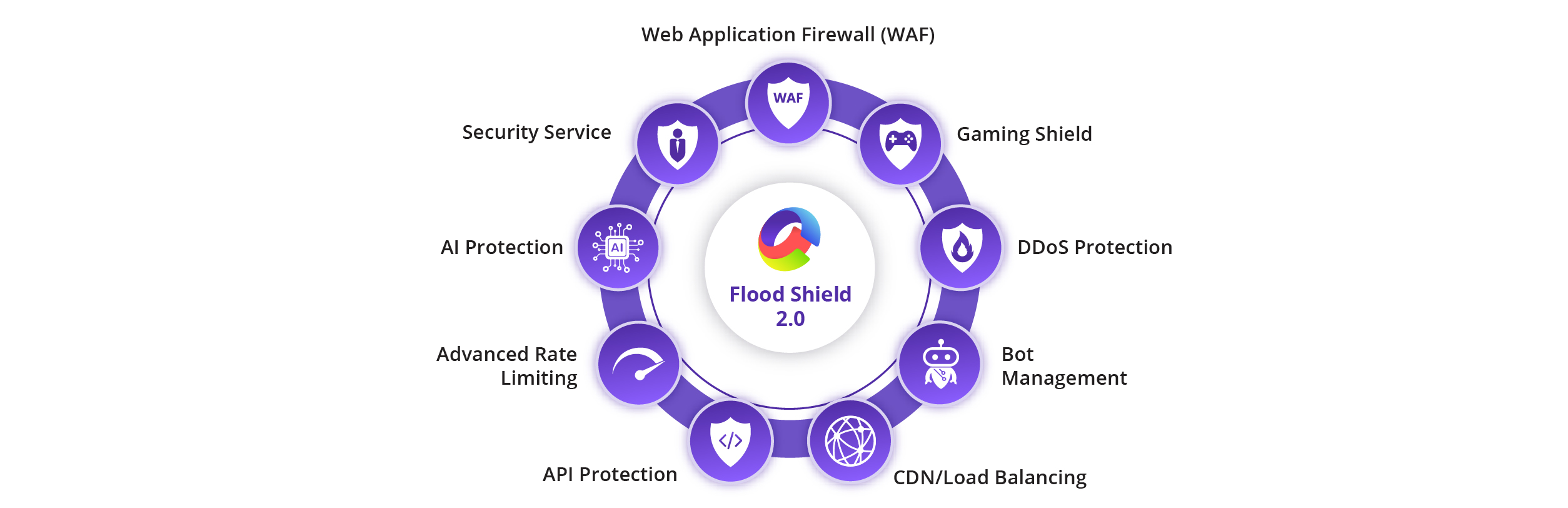
The key benefits of Flood Shield 2.0 include:
1. Lowers Operational Burden
Flood Shield 2.0 runs on a cloud-native architecture, eliminating the need for manual activation or on-premises hardware. Enterprises can rely on automatic detection and mitigation of L3/L4 and L7 attacks, reducing the operational load on internal security teams.
2. Simplifies Complexity
With integrated Web Application and API Protection (WAAP), Flood Shield 2.0 handles network, application, and bot-driven attacks seamlessly. AI-powered detection and automated traffic scrubbing ensure protection is active at all times without manual configuration.
3. Reduces False Positives
The AI engine continuously profiles traffic and identifies suspicious patterns in real time. This ensures malicious traffic is blocked while legitimate users can access applications and APIs without disruption.
4. Continuously Evolves
Flood Shield 2.0 adapts to new and emerging threats, using global threat intelligence and machine learning to detect multi-vector and zero-day attacks. The system updates dynamically to stay ahead of sophisticated attack trends.
5. Resource Efficient
With 40+ global scrubbing centers and over 20 Tbps mitigation capacity, Flood Shield 2.0 absorbs massive attacks at the edge, keeping origin servers unaffected. This global infrastructure ensures low latency, operational continuity, and seamless user experience even during large-scale attacks.
6. 24/7/365 Expert Support
CDNetworks provides around-the-clock monitoring and support, ensuring immediate response to any attack scenario, no matter the time of day. Enterprises can maintain uptime and customer trust without worrying about attack windows or off-hours incidents.
Flood Shield 2.0 combines AI-driven detection, global scrubbing, WAAP features, and cloud-native architecture into a single solution, giving enterprises resilient, always-on protection against modern DDoS threats. Sign up for a free trial to learn more →
Frequently Asked Questions
1. What is the solution for a DDoS attack?
A multi-step approach: detect, filter traffic, rate limit, scrub, scale infrastructure, and isolate critical services. Together, these measures maintain continuity and minimize disruption.
2. Why are DDoS attacks dangerous?
DDoS attacks are dangerous because they disrupt normal operations. They can make websites and applications unavailable, slow down critical services, and prevent real users from accessing resources.
In addition to immediate downtime, DDoS attacks can damage reputation, reduce revenue, and expose system vulnerabilities, which attackers may exploit in later attacks. Even a short outage can have significant consequences for businesses that rely on online services.
3. How long does a DDoS usually last?
From minutes to days. Some attacks are persistent or repeated, highlighting the need for ongoing monitoring.
4. Can a DDoS be stopped?
Yes, with early detection and layered defenses, attacks can be mitigated or neutralized.
5. Can a firewall stop a DDoS attack?
A firewall alone is rarely sufficient for large-scale or application-layer attacks. It is most effective as part of a broader defense strategy.